When I built the login system for this site, my first reflex was the same as everyone's: send the login request, drop the returned JWT into localStorage, attach it to every request. Three lines of code, and it works. Then I asked myself: who else can read this token?
threat model
The answer is uncomfortable: every piece of JavaScript running on the page. localStorage has zero defense against XSS — a single injected script can grab the token and ship it anywhere. If you're thinking "XSS, on my site?", remember the attack surface isn't just the code you wrote: it's every npm dependency, their dependencies, and that third-party analytics script you'll add one day. When popular packages get hijacked in supply-chain attacks, sweeping localStorage is one of the first things the payload does.
An httpOnly cookie, as the name says, is invisible to JavaScript. Print document.cookie — it's not there. XSS is still a bad day, but the attacker cannot steal the token.
the bff pattern
What I built is a simplified BFF (Backend-for-Frontend). The rule fits in one sentence: the token never reaches the browser.
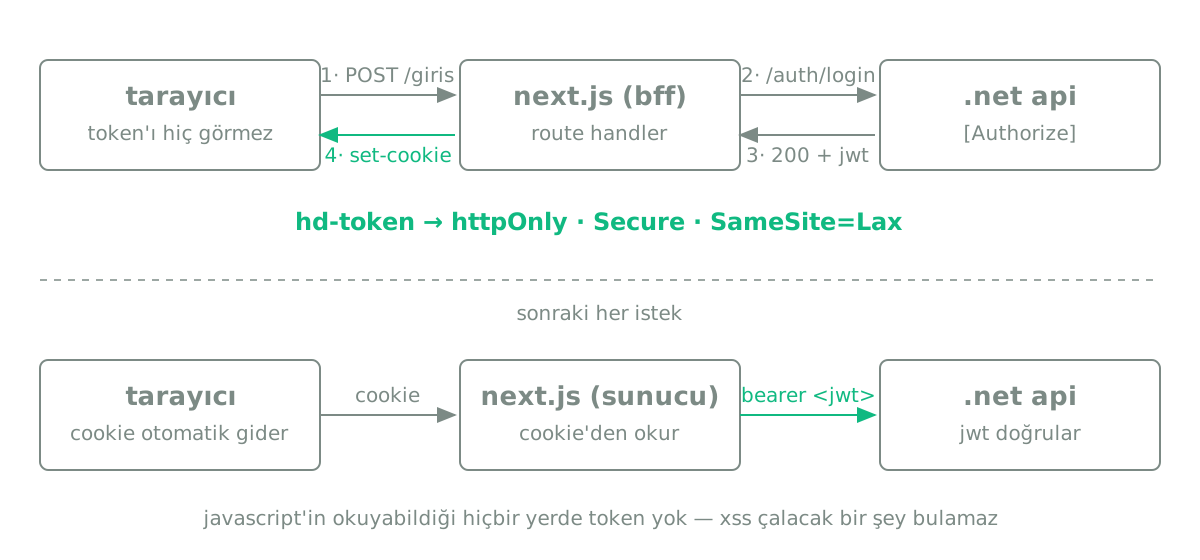
The login form doesn't POST to the .NET API directly — it POSTs to Next.js's own route handler. The handler gets the JWT from the API and writes it as an httpOnly cookie:
// app/api/auth/login/route.ts
export async function POST(req: Request) {
  const res = await fetch(`${API_BASE}/api/auth/login`, {
    method: "POST",
    body: JSON.stringify(await req.json()),
    headers: { "Content-Type": "application/json" },
  });
  if (!res.ok) return NextResponse.json({ message: "login failed" }, { status: 400 });

  const { token, role } = await res.json();
  const out = NextResponse.json({ role });
  out.cookies.set("hd-token", token, {
    httpOnly: true, secure: true, sameSite: "lax", maxAge: 60 * 60 * 12,
  });
  return out;
}
bearer on the server
So who fetches the protected data? Server components and server actions. Both run on the server, so they can read the cookie and forward it to the API as a Bearer header — again without the token ever touching browser JavaScript:
// lib/server-api.ts (runs on the server)
import { cookies } from "next/headers";

export async function adminGet(path: string) {
  const token = cookies().get("hd-token")?.value;
  return fetch(`${API_BASE}${path}`, {
    headers: { Authorization: `Bearer ${token}` },
    cache: "no-store",
  });
}
middleware is just the doorman
Next.js middleware guards pages like /panel, but don't mistake it for a security boundary. Middleware is UX: it politely redirects signed-out users to the login page. The real protection lives on the .NET side, in the [Authorize(Roles = "Admin")] on every admin endpoint. Even if you tamper with the readable role cookie, the API returns 403 — you can fool the doorman, not the lock on the safe.
small but important
The pattern alone isn't enough; these ship with it:
SameSite=Lax — with cookie-based auth, take CSRF seriously; my mutations are server actions and cookies don't ride along on cross-site POSTs, which narrows the risk. Secure — in production the cookie only travels over HTTPS. Rate limiting — the login endpoint allows just a few attempts per minute, which ruins a credential-stuffing bot's day. The JWT key — the app refuses to go to production with the default key baked into the code: if Jwt__Key isn't provided via the environment, it simply won't start in Production. My favorite kind of security measure: the kind that's impossible to forget.
summary
Browser storage is not where a JWT belongs. If you're on Next.js, a BFF is half a day of work: write the token to an httpOnly cookie in a route handler, make protected calls on the server, use middleware for UX, and enforce authorization in the API. Everything on this site — including the page you're reading — runs on exactly this setup.